

How to use fields and expansions
By default, the X API v2 data objects include a small number of default fields when making a request without the use of the fields or expansions parameters. This guide will show you how to use thefields and expansions query parameters in your request to receive additional objects and fields in your response.
In this guide, we will be requesting several fields in the following Tweet screenshot.
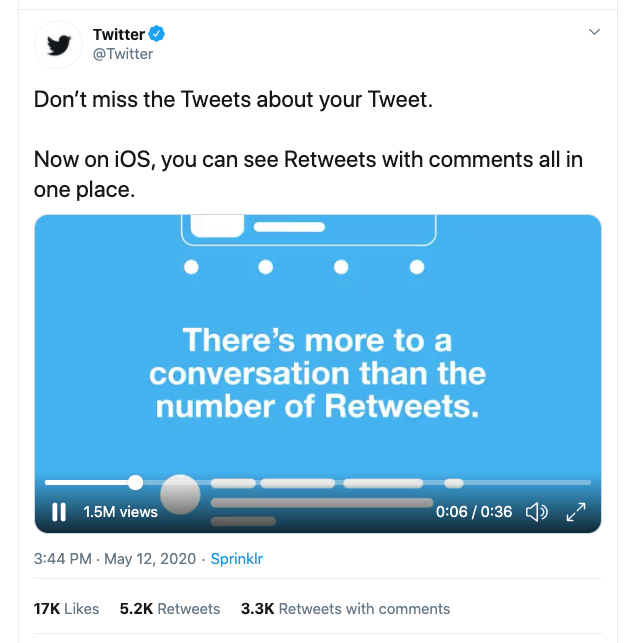 As you can see in the screenshot, there are several visible pieces of information related to the Tweet, including the Tweet author, Tweet metrics, created timestamp, video, and video view count. There are also several pieces of data that are not visible within the screenshot, but are still available to request.
When making a request to the API, the default response is simple, containing only the default Tweet fields (id and text). You will also only receive the primary object that returns with the given endpoint that you are using, and not any of the associated data objects that might relate to the primary object.
This simplicity, along with the fields and expansions parameters, enable you to request only those fields you require, depending on your use case.
As you can see in the screenshot, there are several visible pieces of information related to the Tweet, including the Tweet author, Tweet metrics, created timestamp, video, and video view count. There are also several pieces of data that are not visible within the screenshot, but are still available to request.
When making a request to the API, the default response is simple, containing only the default Tweet fields (id and text). You will also only receive the primary object that returns with the given endpoint that you are using, and not any of the associated data objects that might relate to the primary object.
This simplicity, along with the fields and expansions parameters, enable you to request only those fields you require, depending on your use case.
Requesting additional fields and objects.
First off, we will be requesting a Tweet object using a Tweet ID and the GET /tweets endpoint. Request:curl --request GET --url 'https://api.x.com/2/tweets?ids=1260294888811347969' \
--header 'Authorization: Bearer $BEARER_TOKEN'
{
"data": [
  {
      "id": "1260294888811347969",
      "text": "Don’t miss the Tweets about your Tweet. \n\nNow on iOS, you can see Retweets with comments all in one place. https://t.co/oanjZfzC6y"
  }
]
}
- Identify the additional fields that you would like to request by using our object model, or by reviewing the list of fields in the endpoints’ API reference pages. In this case, we will be requesting the following additional fields: attachments, author_id, created_at, public_metrics.
-
Build the
tweet.fieldsquery parameter with the above fields as its value using a comma-separated list:?tweet.fields=attachments,author_id,created_at,public_metrics - Add the query parameter to the GET /tweets request that you made earlier.
curl --request GET --url 'https://api.x.com/2/tweets?ids=1260294888811347969&tweet.fields=attachments,author_id,created_at,public_metrics' \ --header 'Authorization: Bearer $BEARER_TOKEN'
Response:
{
"data": [
  {
      "id": "1260294888811347969",
      "text": "Don’t miss the Tweets about your Tweet. \n\nNow on iOS, you can see Retweets with comments all in one place. https://t.co/oanjZfzC6y",
      "author_id": "783214",
      "public_metrics": {
          "retweet_count": 5219,
          "reply_count": 1828,
          "like_count": 17141,
          "quote_count": 3255
      },
      "attachments": {
          "media_keys": [
              "13_1260294804770041858"
          ]
      },
      "created_at": "2020-05-12T19:44:51.000Z"
  }
]
}
expansions parameter with attachments.media_keys as the value, and add this to the request.
?expansions=attachments.media_keys
Request:
curl --request GET --url 'https://api.x.com/2/tweets?ids=1260294888811347969&tweet.fields=attachments,author_id,created_at,public_metrics&expansions=attachments.media_keys' \
--header 'Authorization: Bearer $BEARER_TOKEN'
  {
  "data": [
      {
          "id": "1260294888811347969",
          "text": "Don’t miss the Tweets about your Tweet. \n\nNow on iOS, you can see Retweets with comments all in one place. https://t.co/oanjZfzC6y",
          "public_metrics": {
              "retweet_count": 5219,
              "reply_count": 1828,
              "like_count": 17141,
              "quote_count": 3255
          },
          "created_at": "2020-05-12T19:44:51.000Z",
          "attachments": {
              "media_keys": [
                  "13_1260294804770041858"
              ]
          },
          "author_id": "783214"
      }
  ],
  "includes": {
      "media": [
          {
              "media_key": "13_1260294804770041858",
              "type": "video"
          }
      ]
  }
}
media.fields parameter with the comma-separated values, public_metrics and duration_ms in your request.
?media.fields=public_metrics,duration_ms
Request:
curl --request GET --url 'https://api.x.com/2/tweets?ids=1260294888811347969&tweet.fields=attachments,author_id,created_at,public_metrics&expansions=attachments.media_keys&media.fields=duration_ms,public_metrics' --header 'Authorization: Bearer $BEARER_TOKEN'
Response, which now includes all the data that can be seen in the Tweet screenshot:
{
  "data": [
      {
          "id": "1260294888811347969",
          "text": "Don’t miss the Tweets about your Tweet. \n\nNow on iOS, you can see Retweets with comments all in one place. https://t.co/oanjZfzC6y",
          "author_id": "783214",
          "public_metrics": {
              "retweet_count": 5219,
              "reply_count": 1828,
              "like_count": 17141,
              "quote_count": 3255
          },
          "created_at": "2020-05-12T19:44:51.000Z",
          "attachments": {
              "media_keys": [
                  "13_1260294804770041858"
              ]
          }
      }
  ],
  "includes": {
      "media": [
          {
              "duration_ms": 36503,
              "media_key": "13_1260294804770041858",
              "public_metrics": {
                  "view_count": 1534703
              },
              "type": "video"
          }
      ]
  }
}
- ids=1260294888811347969
- tweet.fields=attachments,author_id,created_at,public_metrics
- expansions=attachments.media_keys
- media.fields=public_metrics,duration_ms
?ids=1260294888811347969&tweet.fields=attachments,author\_id,created\_at,public\_metrics&expansions=attachments.media\_keys&media.fields=public\_metrics,duration\_ms
X API v2 Example payloads
Tweet
{
"data": [
  {
    "conversation_id": "1304102743196356610",
    "id": "1307025659294674945",
    "possibly_sensitive": false,
    "public_metrics": {
      "retweet_count": 11,
      "reply_count": 2,
      "like_count": 70,
      "quote_count": 1
    },
    "entities": {
      "urls": [
        {
          "start": 74,
          "end": 97,
          "url": "https://t.co/oeF3ZHeKQQ",
          "expanded_url": "https://dev.to/twitterdev/understanding-the-new-tweet-payload-in-the-twitter-api-v2-1fg5",
          "display_url": "dev.to/twitterdev/und…",
          "images": [
            {
              "url": "https://pbs.twimg.com/news_img/1317156296982867969/2uLfv-Bh?format=jpg&name=orig",
              "width": 1128,
              "height": 600
            },
            {
              "url": "https://pbs.twimg.com/news_img/1317156296982867969/2uLfv-Bh?format=jpg&name=150x150",
              "width": 150,
              "height": 150
            }
          ],
          "status": 200,
          "title": "Understanding the new Tweet payload in the X API v2",
          "description": "X recently announced the new X API v2, rebuilt from the ground up to deliver new features...",
          "unwound_url": "https://dev.to/twitterdev/understanding-the-new-tweet-payload-in-the-twitter-api-v2-1fg5"
        }
      ]
    },
    "text": "Here’s an article that highlights the updates in the new Tweet payload v2 https://t.co/oeF3ZHeKQQ",
    "in_reply_to_user_id": "2244994945",
    "created_at": "2020-09-18T18:36:15.000Z",
    "author_id": "2244994945",
    "referenced_tweets": [
      {
        "type": "replied_to",
        "id": "1304102743196356610"
      }
    ],
    "lang": "en",
    "source": "Twitter Web App"
  }
],
"includes": {
  "users": [
    {
      "created_at": "2013-12-14T04:35:55.000Z",
      "profile_image_url": "https://pbs.twimg.com/profile_images/1283786620521652229/lEODkLTh_normal.jpg",
      "entities": {
        "url": {
          "urls": [
            {
              "start": 0,
              "end": 23,
              "url": "https://t.co/3ZX3TNiZCY",
              "expanded_url": "https://developer.x.com/en/community",
              "display_url": "developer.x.com/en/community"
            }
          ]
        },
        "description": {
          "hashtags": [
            {
              "start": 17,
              "end": 28,
              "tag": "TwitterDev"
            },
            {
              "start": 105,
              "end": 116,
              "tag": "TwitterAPI"
            }
          ]
        }
      },
      "id": "2244994945",
      "verified": true,
      "location": "127.0.0.1",
      "description": "The voice of the #TwitterDev team and your official source for updates, news, and events, related to the #TwitterAPI.",
      "pinned_tweet_id": "1293593516040269825",
      "username": "TwitterDev",
      "public_metrics": {
        "followers_count": 513961,
        "following_count": 2039,
        "tweet_count": 3635,
        "listed_count": 1672
      },
      "name": "Twitter Dev",
      "url": "https://t.co/3ZX3TNiZCY",
      "protected": false
    }
  ],
  "tweets": [
    {
      "conversation_id": "1304102743196356610",
      "id": "1304102743196356610",
      "possibly_sensitive": false,
      "public_metrics": {
        "retweet_count": 31,
        "reply_count": 12,
        "like_count": 104,
        "quote_count": 4
      },
      "entities": {
        "mentions": [
          {
            "start": 146,
            "end": 158,
            "username": "suhemparack"
          }
        ],
        "urls": [
          {
            "start": 237,
            "end": 260,
            "url": "https://t.co/CjneyMpgCq",
            "expanded_url": "https://x.com/TwitterDev/status/1304102743196356610/video/1",
            "display_url": "pic.x.com/CjneyMpgCq"
          }
        ],
        "hashtags": [
          {
            "start": 8,
            "end": 19,
            "tag": "TwitterAPI"
          }
        ]
      },
      "attachments": {
        "media_keys": [
          "13_1303848070984024065"
        ]
      },
      "text": "The new #TwitterAPI includes some improvements to the Tweet payload. You’re probably wondering — what are the main differences? 🧐\n\nIn this video, @SuhemParack compares the v1.1 Tweet payload with what you’ll find using our v2 endpoints. https://t.co/CjneyMpgCq",
      "created_at": "2020-09-10T17:01:37.000Z",
      "author_id": "2244994945",
      "lang": "en",
      "source": "Twitter Media Studio"
    }
  ]
}
}
Tweet reply
{
"data": [
  {
    "lang": "en",
    "conversation_id": "1296887091901718529",
    "text": "See how @PennMedCDH are using Twitter data to understand the COVID-19 health crisis 📊\n\nhttps://t.co/1tdA8uDWes",
    "referenced_tweets": [
      {
        "type": "replied_to",
        "id": "1296887091901718529"
      }
    ],
    "possibly_sensitive": false,
    "entities": {
      "annotations": [
        {
          "start": 30,
          "end": 36,
          "probability": 0.6318,
          "type": "Product",
          "normalized_text": "Twitter"
        }
      ],
      "mentions": [
        {
          "start": 8,
          "end": 19,
          "username": "PennMedCDH"
        }
      ],
      "urls": [
        {
          "start": 87,
          "end": 110,
          "url": "https://t.co/1tdA8uDWes",
          "expanded_url": "https://developer.x.com/en/use-cases/success-stories/penn",
          "display_url": "developer.x.com/en/use-cases/s…",
          "status": 200,
          "title": "Penn Medicine Center for Digital Health",
          "description": "Penn Med Center for Digital Health has created a COVID-19 Twitter map that includes charts detailing sentiment, symptoms reported, state-by-state data cuts, and border data on the COVID-19 outbreak. In addition, their Penn Med With You initiative uses aggregate regional information from Twitter to inform their website and text-messaging service. The service uses this information to disseminate relevant and timely resources.",
          "unwound_url": "https://developer.x.com/en/use-cases/success-stories/penn"
        }
      ]
    },
    "id": "1296887316556980230",
    "public_metrics": {
      "retweet_count": 9,
      "reply_count": 3,
      "like_count": 26,
      "quote_count": 2
    },
    "author_id": "2244994945",
    "in_reply_to_user_id": "2244994945",
    "context_annotations": [
      {
        "domain": {
          "id": "46",
          "name": "Brand Category",
          "description": "Categories within Brand Verticals that narrow down the scope of Brands"
        },
        "entity": {
          "id": "781974596752842752",
          "name": "Services"
        }
      },
      {
        "domain": {
          "id": "47",
          "name": "Brand",
          "description": "Brands and Companies"
        },
        "entity": {
          "id": "10045225402",
          "name": "Twitter"
        }
      },
      {
        "domain": {
          "id": "123",
          "name": "Ongoing News Story",
          "description": "Ongoing News Stories like 'Brexit'"
        },
        "entity": {
          "id": "1220701888179359745",
          "name": "COVID-19"
        }
      }
    ],
    "source": "Twitter Web App",
    "created_at": "2020-08-21T19:10:05.000Z"
  }
],
"includes": {
  "users": [
    {
      "created_at": "2013-12-14T04:35:55.000Z",
      "id": "2244994945",
      "protected": false,
      "username": "TwitterDev",
      "verified": true,
      "entities": {
        "url": {
          "urls": [
            {
              "start": 0,
              "end": 23,
              "url": "https://t.co/3ZX3TNiZCY",
              "expanded_url": "https://developer.x.com/en/community",
              "display_url": "developer.x.com/en/community"
            }
          ]
        },
        "description": {
          "hashtags": [
            {
              "start": 17,
              "end": 28,
              "tag": "TwitterDev"
            },
            {
              "start": 105,
              "end": 116,
              "tag": "TwitterAPI"
            }
          ]
        }
      },
      "description": "The voice of the #TwitterDev team and your official source for updates, news, and events, related to the #TwitterAPI.",
      "pinned_tweet_id": "1293593516040269825",
      "public_metrics": {
        "followers_count": 513962,
        "following_count": 2039,
        "tweet_count": 3635,
        "listed_count": 1672
      },
      "location": "127.0.0.1",
      "name": "Twitter Dev",
      "profile_image_url": "https://pbs.twimg.com/profile_images/1283786620521652229/lEODkLTh_normal.jpg",
      "url": "https://t.co/3ZX3TNiZCY"
    },
    {
      "created_at": "2013-07-23T16:58:03.000Z",
      "id": "1615654896",
      "protected": false,
      "username": "PennMedCDH",
      "verified": false,
      "entities": {
        "url": {
          "urls": [
            {
              "start": 0,
              "end": 23,
              "url": "https://t.co/7eS9RuwIb9",
              "expanded_url": "http://centerfordigitalhealth.upenn.edu/",
              "display_url": "centerfordigitalhealth.upenn.edu"
            }
          ]
        },
        "description": {
          "mentions": [
            {
              "start": 0,
              "end": 13,
              "username": "PennMedicine"
            }
          ]
        }
      },
      "description": "@PennMedicine's Center for Digital Health advances science by researching the implications of the advancement of digital health technology in health care.",
      "public_metrics": {
        "followers_count": 1348,
        "following_count": 455,
        "tweet_count": 1288,
        "listed_count": 92
      },
      "location": "Philadelphia, PA",
      "name": "Penn Med CDH",
      "profile_image_url": "https://pbs.twimg.com/profile_images/1067488849725726723/MoO3FQ44_normal.jpg",
      "url": "https://t.co/7eS9RuwIb9"
    }
  ],
  "tweets": [
    {
      "lang": "en",
      "conversation_id": "1296887091901718529",
      "text": "Dr. @RainaMerchant and her team at the Penn Medicine CDH are helping build the future of health care.\n\nThe team is using insights from social data in many different ways — ranging from uncovering risk factors to shedding light on public sentiment. 🔎",
      "possibly_sensitive": false,
      "entities": {
        "annotations": [
          {
            "start": 39,
            "end": 55,
            "probability": 0.8274,
            "type": "Organization",
            "normalized_text": "Penn Medicine CDH"
          }
        ],
        "mentions": [
          {
            "start": 4,
            "end": 18,
            "username": "RainaMerchant"
          }
        ]
      },
      "id": "1296887091901718529",
      "public_metrics": {
        "retweet_count": 9,
        "reply_count": 7,
        "like_count": 32,
        "quote_count": 0
      },
      "author_id": "2244994945",
      "source": "Twitter Web App",
      "created_at": "2020-08-21T19:09:12.000Z"
    }
  ]
}
}
Extended Tweet
{
"data": [
  {
    "conversation_id": "1296121314218897408",
    "id": "1296121314218897408",
    "possibly_sensitive": false,
    "public_metrics": {
      "retweet_count": 54,
      "reply_count": 9,
      "like_count": 172,
      "quote_count": 23
    },
    "entities": {
      "urls": [
        {
          "start": 192,
          "end": 215,
          "url": "https://t.co/khXhTurm9x",
          "expanded_url": "https://devcommunity.x.com/t/hide-replies-now-available-in-the-new-twitter-api/140996",
          "display_url": "devcommunity.com/t/hide-replies…",
          "images": [
            {
              "url": "https://pbs.twimg.com/news_img/1296121315514957825/3CI24hSI?format=png&name=orig",
              "width": 400,
              "height": 400
            },
            {
              "url": "https://pbs.twimg.com/news_img/1296121315514957825/3CI24hSI?format=png&name=150x150",
              "width": 150,
              "height": 150
            }
          ],
          "status": 200,
          "title": "Hide replies now available in the new Twitter API",
          "description": "Today, we’re happy to announce the general availability of the hide replies endpoint in the new Twitter API. The hide replies endpoint allows you to build tools that help people hide or unhide replies to their Tweets. People manage their replies for many reasons, including to give less attention to comments that are abusive, distracting, misleading, or to make conversations more engaging. Through this endpoint, you can build tools to help people on Twitter hide or unhide replies faster and more...",
          "unwound_url": "https://devcommunity.x.com/t/hide-replies-now-available-in-the-new-twitter-api/140996"
        }
      ],
      "hashtags": [
        {
          "start": 178,
          "end": 189,
          "tag": "TwitterAPI"
        }
      ]
    },
    "text": "The hide replies endpoint is launching today! \n\nDevelopers can hide replies to Tweets - a crucial way developers can help improve the health of the public conversation using the #TwitterAPI.\n\nhttps://t.co/khXhTurm9x",
    "created_at": "2020-08-19T16:26:16.000Z",
    "context_annotations": [
      {
        "domain": {
          "id": "65",
          "name": "Interests and Hobbies Vertical",
          "description": "Top level interests and hobbies groupings, like Food or Travel"
        },
        "entity": {
          "id": "848920371311001600",
          "name": "Technology",
          "description": "Technology and computing"
        }
      },
      {
        "domain": {
          "id": "66",
          "name": "Interests and Hobbies Category",
          "description": "A grouping of interests and hobbies entities, like Novelty Food or Destinations"
        },
        "entity": {
          "id": "848921413196984320",
          "name": "Computer programming",
          "description": "Computer programming"
        }
      }
    ],
    "author_id": "2244994945",
    "lang": "en",
    "source": "Twitter Web App"
  }
],
"includes": {
  "users": [
    {
      "created_at": "2013-12-14T04:35:55.000Z",
      "profile_image_url": "https://pbs.twimg.com/profile_images/1283786620521652229/lEODkLTh_normal.jpg",
      "entities": {
        "url": {
          "urls": [
            {
              "start": 0,
              "end": 23,
              "url": "https://t.co/3ZX3TNiZCY",
              "expanded_url": "https://developer.x.com/en/community",
              "display_url": "developer.x.com/en/community"
            }
          ]
        },
        "description": {
          "hashtags": [
            {
              "start": 17,
              "end": 28,
              "tag": "TwitterDev"
            },
            {
              "start": 105,
              "end": 116,
              "tag": "TwitterAPI"
            }
          ]
        }
      },
      "id": "2244994945",
      "verified": true,
      "location": "127.0.0.1",
      "description": "The voice of the #TwitterDev team and your official source for updates, news, and events, related to the #TwitterAPI.",
      "pinned_tweet_id": "1293593516040269825",
      "username": "TwitterDev",
      "public_metrics": {
        "followers_count": 513962,
        "following_count": 2039,
        "tweet_count": 3635,
        "listed_count": 1672
      },
      "name": "Twitter Dev",
      "url": "https://t.co/3ZX3TNiZCY",
      "protected": false
    }
  ]
}
}
Tweet with media
{
"data": [
{
"lang": "en",
"conversation_id": "1293593516040269825",
"text": "It’s finally here! 🥁 Say hello to the new #TwitterAPI.\n\nWe’re rebuilding the X API v2 from the ground up to better serve our developer community. And today’s launch is only the beginning.\n\nhttps://t.co/32VrwpGaJw https://t.co/KaFSbjWUA8",
"attachments": {
"media_keys": [
"7_1293565706408038401"
]
},
"possibly_sensitive": false,
"entities": {
"annotations": [
{
"start": 78,
"end": 88,
"probability": 0.4381,
"type": "Product",
"normalized_text": "Twitter API"
}
],
"hashtags": [
{
"start": 42,
"end": 53,
"tag": "TwitterAPI"
}
],
"urls": [
{
"start": 195,
"end": 218,
"url": "https://t.co/32VrwpGaJw",
"expanded_url": "https://blog.x.com/developer/en_us/topics/tools/2020/introducing_new_twitter_api.html",
"display_url": "blog.x.com/developer/en_u…",
"images": [
{
"url": "https://pbs.twimg.com/news_img/1336475659279818754/_cmRh7QE?format=jpg&name=orig",
"width": 1200,
"height": 627
},
{
"url": "https://pbs.twimg.com/news_img/1336475659279818754/_cmRh7QE?format=jpg&name=150x150",
"width": 150,
"height": 150
}
],
"status": 200,
"title": "Introducing a new and improved X API",
"description": "Introducing the new X API - rebuilt from the ground up to deliver new features faster so developers can help the world connect to the public conversation happening on Twitter.",
"unwound_url": "https://blog.x.com/developer/en_us/topics/tools/2020/introducing_new_twitter_api.html"
},
{
"start": 219,
"end": 242,
"url": "https://t.co/KaFSbjWUA8",
"expanded_url": "https://x.com/TwitterDev/status/1293593516040269825/video/1",
"display_url": "pic.x.com/KaFSbjWUA8"
}
]
},
"id": "1293593516040269825",
"public_metrics": {
"retweet_count": 958,
"reply_count": 171,
"like_count": 2848,
"quote_count": 333
},
"author_id": "2244994945",
"context_annotations": [
{
"domain": {
"id": "46",
"name": "Brand Category",
"description": "Categories within Brand Verticals that narrow down the scope of Brands"
},
"entity": {
"id": "781974596752842752",
"name": "Services"
}
},
{
"domain": {
"id": "47",
"name": "Brand",
"description": "Brands and Companies"
},
"entity": {
"id": "10045225402",
"name": "Twitter"
}
},
{
"domain": {
"id": "65",
"name": "Interests and Hobbies Vertical",
"description": "Top level interests and hobbies groupings, like Food or Travel"
},
"entity": {
"id": "848920371311001600",
"name": "Technology",
"description": "Technology and computing"
}
},
{
"domain": {
"id": "66",
"name": "Interests and Hobbies Category",
"description": "A grouping of interests and hobbies entities, like Novelty Food or Destinations"
},
"entity": {
"id": "848921413196984320",
"name": "Computer programming",
"description": "Computer programming"
}
}
],
"source": "Twitter Web App",
"created_at": "2020-08-12T17:01:42.000Z"
}
],
"includes": {
"media": [
{
"height": 720,
"duration_ms": 34875,
"media_key": "7_1293565706408038401",
"type": "video",
"preview_image_url": "https://pbs.twimg.com/ext_tw_video_thumb/1293565706408038401/pu/img/66P2dvbU4a02jYbV.jpg",
"public_metrics": {
"view_count": 279438
},
"width": 1280
}
],
"users": [
{
"created_at": "2013-12-14T04:35:55.000Z",
"id": "2244994945",
"protected": false,
"username": "TwitterDev",
"verified": true,
"entities": {
"url": {
"urls": [
{
"start": 0,
"end": 23,
"url": "https://t.co/3ZX3TNiZCY",
"expanded_url": "https://developer.x.com/en/community",
"display_url": "developer.x.com/en/community"
}
]
},
"description": {
"hashtags": [
{
"start": 17,
"end": 28,
"tag": "TwitterDev"
},
{
"start": 105,
"end": 116,
"tag": "TwitterAPI"
}
]
}
},
"description": "The voice of the #TwitterDev team and your official source for updates, news, and events, related to the #TwitterAPI.",
"pinned_tweet_id": "1293593516040269825",
"public_metrics": {
"followers_count": 513962,
"following_count": 2039,
"tweet_count": 3635,
"listed_count": 1672
},
"location": "127.0.0.1",
"name": "Twitter Dev",
"profile_image_url": "https://pbs.twimg.com/profile_images/1283786620521652229/lEODkLTh_normal.jpg",
"url": "https://t.co/3ZX3TNiZCY"
}
]
}
}`
### Retweet
`{
"data": [
{
"public_metrics": {
"retweet_count": 19,
"reply_count": 0,
"like_count": 0,
"quote_count": 0
},
"conversation_id": "1229851574555508737",
"id": "1229851574555508737",
"entities": {
"annotations": [
{
"start": 28,
"end": 38,
"probability": 0.261,
"type": "Product",
"normalized_text": "Alexa Skill"
},
{
"start": 44,
"end": 50,
"probability": 0.7332,
"type": "Product",
"normalized_text": "Twitter"
}
],
"mentions": [
{
"start": 3,
"end": 15,
"username": "suhemparack"
}
]
},
"text": "RT @suhemparack: I built an Alexa Skill for Twitter using APL that allows you to view Tweets and Trends on the echo show!\n\nCheck it out her…",
"created_at": "2020-02-18T19:33:59.000Z",
"possibly_sensitive": false,
"author_id": "2244994945",
"referenced_tweets": [
{
"type": "retweeted",
"id": "1229843515603144704"
}
],
"context_annotations": [
{
"domain": {
"id": "47",
"name": "Brand",
"description": "Brands and Companies"
},
"entity": {
"id": "10026792024",
"name": "Amazon"
}
},
{
"domain": {
"id": "48",
"name": "Product",
"description": "Products created by Brands. Examples: Ford Explorer, Apple iPhone."
},
"entity": {
"id": "968221983803494400",
"name": "Amazon - Alexa",
"description": "Alexa"
}
},
{
"domain": {
"id": "46",
"name": "Brand Category",
"description": "Categories within Brand Verticals that narrow down the scope of Brands"
},
"entity": {
"id": "781974596752842752",
"name": "Services"
}
},
{
"domain": {
"id": "47",
"name": "Brand",
"description": "Brands and Companies"
},
"entity": {
"id": "10045225402",
"name": "Twitter"
}
}
],
"source": "Twitter Web App",
"lang": "en"
}
],
"includes": {
"users": [
{
"profile_image_url": "https://pbs.twimg.com/profile_images/1283786620521652229/lEODkLTh_normal.jpg",
"username": "TwitterDev",
"name": "Twitter Dev",
"location": "127.0.0.1",
"url": "https://t.co/3ZX3TNiZCY",
"entities": {
"url": {
"urls": [
{
"start": 0,
"end": 23,
"url": "https://t.co/3ZX3TNiZCY",
"expanded_url": "https://developer.x.com/en/community",
"display_url": "developer.x.com/en/community"
}
]
},
"description": {
"hashtags": [
{
"start": 17,
"end": 28,
"tag": "TwitterDev"
},
{
"start": 105,
"end": 116,
"tag": "TwitterAPI"
}
]
}
},
"id": "2244994945",
"description": "The voice of the #TwitterDev team and your official source for updates, news, and events, related to the #TwitterAPI.",
"verified": true,
"public_metrics": {
"followers_count": 513962,
"following_count": 2039,
"tweet_count": 3635,
"listed_count": 1672
},
"pinned_tweet_id": "1293593516040269825",
"created_at": "2013-12-14T04:35:55.000Z",
"protected": false
},
{
"profile_image_url": "https://pbs.twimg.com/profile_images/1230703695051935747/TbQKe91L_normal.jpg",
"username": "suhemparack",
"name": "Suhem Parack",
"location": "Seattle, WA",
"url": "https://t.co/8IkCzClPCz",
"entities": {
"url": {
"urls": [
{
"start": 0,
"end": 23,
"url": "https://t.co/8IkCzClPCz",
"expanded_url": "https://developer.x.com",
"display_url": "developer.x.com"
}
]
},
"description": {
"mentions": [
{
"start": 42,
"end": 50,
"username": "Twitter"
}
]
}
},
"id": "857699969263964161",
"description": "Developer Relations for Academic Research @Twitter. Talk to me about research with Twitter data. Previously: Amazon Alexa. Views are my own",
"verified": false,
"public_metrics": {
"followers_count": 738,
"following_count": 512,
"tweet_count": 460,
"listed_count": 12
},
"pinned_tweet_id": "1296498078233571329",
"created_at": "2017-04-27T20:56:22.000Z",
"protected": false
}
],
"tweets": [
{
"public_metrics": {
"retweet_count": 19,
"reply_count": 1,
"like_count": 71,
"quote_count": 6
},
"conversation_id": "1229843515603144704",
"id": "1229843515603144704",
"entities": {
"annotations": [
{
"start": 11,
"end": 21,
"probability": 0.3342,
"type": "Product",
"normalized_text": "Alexa Skill"
},
{
"start": 27,
"end": 33,
"probability": 0.6727,
"type": "Product",
"normalized_text": "Twitter"
}
],
"urls": [
{
"start": 127,
"end": 150,
"url": "https://t.co/l5J8wq748G",
"expanded_url": "https://dev.to/twitterdev/building-an-alexa-skill-for-twitter-using-alexa-presentation-language-1aj0",
"display_url": "dev.to/twitterdev/bui…",
"status": 200,
"unwound_url": "https://dev.to/twitterdev/building-an-alexa-skill-for-twitter-using-alexa-presentation-language-1aj0"
}
]
},
"text": "I built an Alexa Skill for Twitter using APL that allows you to view Tweets and Trends on the echo show!\n\nCheck it out here 👇\n\nhttps://t.co/l5J8wq748G",
"created_at": "2020-02-18T19:01:58.000Z",
"possibly_sensitive": false,
"author_id": "857699969263964161",
"context_annotations": [
{
"domain": {
"id": "47",
"name": "Brand",
"description": "Brands and Companies"
},
"entity": {
"id": "10026792024",
"name": "Amazon"
}
},
{
"domain": {
"id": "48",
"name": "Product",
"description": "Products created by Brands. Examples: Ford Explorer, Apple iPhone."
},
"entity": {
"id": "968221983803494400",
"name": "Amazon - Alexa",
"description": "Alexa"
}
},
{
"domain": {
"id": "46",
"name": "Brand Category",
"description": "Categories within Brand Verticals that narrow down the scope of Brands"
},
"entity": {
"id": "781974596752842752",
"name": "Services"
}
},
{
"domain": {
"id": "47",
"name": "Brand",
"description": "Brands and Companies"
},
"entity": {
"id": "10045225402",
"name": "Twitter"
}
}
],
"source": "Twitter Web App",
"lang": "en"
}
]
}
}`
### Quote Tweet
`{
"data": [
{
"lang": "en",
"conversation_id": "1328399838128467969",
"text": "As planned, the Labs v2 endpoints referenced below have now been retired. Please let us know in the forums if you have questions or need help with the X API v2! https://t.co/JaxttUMmjX",
"referenced_tweets": [
{
"type": "quoted",
"id": "1327011423252144128"
}
],
"possibly_sensitive": false,
"entities": {
"annotations": [
{
"start": 151,
"end": 157,
"probability": 0.8115,
"type": "Product",
"normalized_text": "Twitter"
}
],
"urls": [
{
"start": 167,
"end": 190,
"url": "https://t.co/JaxttUMmjX",
"expanded_url": "https://x.com/TwitterDev/status/1327011423252144128",
"display_url": "twitter.com/TwitterDev/sta…"
}
]
},
"id": "1328399838128467969",
"public_metrics": {
"retweet_count": 7,
"reply_count": 4,
"like_count": 29,
"quote_count": 1
},
"author_id": "2244994945",
"context_annotations": [
{
"domain": {
"id": "46",
"name": "Brand Category",
"description": "Categories within Brand Verticals that narrow down the scope of Brands"
},
"entity": {
"id": "781974596752842752",
"name": "Services"
}
},
{
"domain": {
"id": "47",
"name": "Brand",
"description": "Brands and Companies"
},
"entity": {
"id": "10045225402",
"name": "Twitter"
}
},
{
"domain": {
"id": "65",
"name": "Interests and Hobbies Vertical",
"description": "Top level interests and hobbies groupings, like Food or Travel"
},
"entity": {
"id": "848920371311001600",
"name": "Technology",
"description": "Technology and computing"
}
},
{
"domain": {
"id": "66",
"name": "Interests and Hobbies Category",
"description": "A grouping of interests and hobbies entities, like Novelty Food or Destinations"
},
"entity": {
"id": "848921413196984320",
"name": "Computer programming",
"description": "Computer programming"
}
}
],
"source": "Twitter Web App",
"created_at": "2020-11-16T18:09:36.000Z"
}
],
"includes": {
"users": [
{
"created_at": "2013-12-14T04:35:55.000Z",
"id": "2244994945",
"protected": false,
"username": "TwitterDev",
"verified": true,
"entities": {
"url": {
"urls": [
{
"start": 0,
"end": 23,
"url": "https://t.co/3ZX3TNiZCY",
"expanded_url": "https://developer.x.com/en/community",
"display_url": "developer.x.com/en/community"
}
]
},
"description": {
"hashtags": [
{
"start": 17,
"end": 28,
"tag": "TwitterDev"
},
{
"start": 105,
"end": 116,
"tag": "TwitterAPI"
}
]
}
},
"description": "The voice of the #TwitterDev team and your official source for updates, news, and events, related to the #TwitterAPI.",
"pinned_tweet_id": "1293593516040269825",
"public_metrics": {
"followers_count": 513962,
"following_count": 2039,
"tweet_count": 3635,
"listed_count": 1672
},
"location": "127.0.0.1",
"name": "Twitter Dev",
"profile_image_url": "https://pbs.twimg.com/profile_images/1283786620521652229/lEODkLTh_normal.jpg",
"url": "https://t.co/3ZX3TNiZCY"
}
],
"tweets": [
{
"lang": "en",
"conversation_id": "1327011423252144128",
"text": "👋 Friendly reminder that Twitter Developer Labs v2 hide replies and recent search will be retired next Monday, November 16! We encourage you to migrate to the new hide replies and recent search endpoints now available in the v2 #TwitterAPI. Details: https://t.co/r6z6CI7kEy",
"possibly_sensitive": false,
"entities": {
"annotations": [
{
"start": 26,
"end": 50,
"probability": 0.4387,
"type": "Product",
"normalized_text": "Twitter Developer Labs v2"
}
],
"hashtags": [
{
"start": 228,
"end": 239,
"tag": "TwitterAPI"
}
],
"urls": [
{
"start": 250,
"end": 273,
"url": "https://t.co/r6z6CI7kEy",
"expanded_url": "https://devcommunity.x.com/t/retiring-labs-v2-recent-search-and-hide-replies/145795",
"display_url": "devcommunity.com/t/retiring-lab…",
"images": [
{
"url": "https://pbs.twimg.com/news_img/1327011425240313856/PkurOyu1?format=jpg&name=orig",
"width": 1200,
"height": 630
},
{
"url": "https://pbs.twimg.com/news_img/1327011425240313856/PkurOyu1?format=jpg&name=150x150",
"width": 150,
"height": 150
}
],
"status": 200,
"title": "Retiring Labs v2 recent search and hide replies",
"description": "As we said in our Early Access and hide replies announcements, the following Twitter Developer Labs v2 endpoints will be retired on November 16th. Labs v2 recent search Labs v2 hide replies If called, these endpoints will respond with an HTTP 410 status and return no data. Based on your feedback from Labs, we incorporated corresponding functionality into the X API v2. The relevant documentation can be found using the links below. Click here to enroll in v2 access if you haven’t already...",
"unwound_url": "https://devcommunity.x.com/t/retiring-labs-v2-recent-search-and-hide-replies/145795"
}
]
},
"id": "1327011423252144128",
"public_metrics": {
"retweet_count": 8,
"reply_count": 2,
"like_count": 33,
"quote_count": 4
},
"author_id": "2244994945",
"context_annotations": [
{
"domain": {
"id": "46",
"name": "Brand Category",
"description": "Categories within Brand Verticals that narrow down the scope of Brands"
},
"entity": {
"id": "781974596752842752",
"name": "Services"
}
},
{
"domain": {
"id": "47",
"name": "Brand",
"description": "Brands and Companies"
},
"entity": {
"id": "10045225402",
"name": "Twitter"
}
},
{
"domain": {
"id": "65",
"name": "Interests and Hobbies Vertical",
"description": "Top level interests and hobbies groupings, like Food or Travel"
},
"entity": {
"id": "848920371311001600",
"name": "Technology",
"description": "Technology and computing"
}
},
{
"domain": {
"id": "66",
"name": "Interests and Hobbies Category",
"description": "A grouping of interests and hobbies entities, like Novelty Food or Destinations"
},
"entity": {
"id": "848921413196984320",
"name": "Computer programming",
"description": "Computer programming"
}
}
],
"source": "Twitter Web App",
"created_at": "2020-11-12T22:12:32.000Z"
}
]
}
}
Retweeted quote Tweet
{
  "data": [
  {
    "lang": "en",
    "conversation_id": "1225470895902412800",
    "text": "RT @AureliaSpecker: 📣 If you enjoyed the London commute tutorial I wrote in November last year, check out the refactored version that uses…",
    "referenced_tweets": [
      {
        "type": "retweeted",
        "id": "1224709550214873090"
      }
    ],
    "possibly_sensitive": false,
    "entities": {
      "annotations": [
        {
          "start": 42,
          "end": 47,
          "probability": 0.6999,
          "type": "Place",
          "normalized_text": "London"
        }
      ],
      "mentions": [
        {
          "start": 3,
          "end": 18,
          "username": "AureliaSpecker"
        }
      ]
    },
    "id": "1225470895902412800",
    "public_metrics": {
      "retweet_count": 12,
      "reply_count": 0,
      "like_count": 0,
      "quote_count": 0
    },
    "author_id": "2244994945",
    "context_annotations": [
      {
        "domain": {
          "id": "46",
          "name": "Brand Category",
          "description": "Categories within Brand Verticals that narrow down the scope of Brands"
        },
        "entity": {
          "id": "781974596752842752",
          "name": "Services"
        }
      },
      {
        "domain": {
          "id": "47",
          "name": "Brand",
          "description": "Brands and Companies"
        },
        "entity": {
          "id": "10045225402",
          "name": "Twitter"
        }
      },
      {
        "domain": {
          "id": "65",
          "name": "Interests and Hobbies Vertical",
          "description": "Top level interests and hobbies groupings, like Food or Travel"
        },
        "entity": {
          "id": "848920371311001600",
          "name": "Technology",
          "description": "Technology and computing"
        }
      },
      {
        "domain": {
          "id": "66",
          "name": "Interests and Hobbies Category",
          "description": "A grouping of interests and hobbies entities, like Novelty Food or Destinations"
        },
        "entity": {
          "id": "848921413196984320",
          "name": "Computer programming",
          "description": "Computer programming"
        }
      }
    ],
    "source": "Twitter for iPhone",
    "created_at": "2020-02-06T17:26:44.000Z"
  }
],
"includes": {
  "users": [
    {
      "created_at": "2013-12-14T04:35:55.000Z",
      "id": "2244994945",
      "protected": false,
      "username": "TwitterDev",
      "verified": true,
      "entities": {
        "url": {
          "urls": [
            {
              "start": 0,
              "end": 23,
              "url": "https://t.co/3ZX3TNiZCY",
              "expanded_url": "https://developer.x.com/en/community",
              "display_url": "developer.x.com/en/community"
            }
          ]
        },
        "description": {
          "hashtags": [
            {
              "start": 17,
              "end": 28,
              "tag": "TwitterDev"
            },
            {
              "start": 105,
              "end": 116,
              "tag": "TwitterAPI"
            }
          ]
        }
      },
      "description": "The voice of the #TwitterDev team and your official source for updates, news, and events, related to the #TwitterAPI.",
      "pinned_tweet_id": "1293593516040269825",
      "public_metrics": {
        "followers_count": 513962,
        "following_count": 2039,
        "tweet_count": 3635,
        "listed_count": 1672
      },
      "location": "127.0.0.1",
      "name": "Twitter Dev",
      "profile_image_url": "https://pbs.twimg.com/profile_images/1283786620521652229/lEODkLTh_normal.jpg",
      "url": "https://t.co/3ZX3TNiZCY"
    },
    {
      "created_at": "2013-01-18T23:45:43.000Z",
      "id": "1102321381",
      "protected": false,
      "username": "AureliaSpecker",
      "verified": false,
      "entities": {
        "description": {
          "mentions": [
            {
              "start": 7,
              "end": 17,
              "username": "TwitterUK"
            },
            {
              "start": 86,
              "end": 95,
              "username": "_dormrod"
            }
          ]
        }
      },
      "description": "devrel @TwitterUK • Swiss in London • mother of houseplants • personal hairdresser to @_dormrod",
      "pinned_tweet_id": "1253069421322567681",
      "public_metrics": {
        "followers_count": 1036,
        "following_count": 1330,
        "tweet_count": 855,
        "listed_count": 26
      },
      "location": "London, UK",
      "name": "Aurelia Specker",
      "profile_image_url": "https://pbs.twimg.com/profile_images/1137517534104772608/8FBYgc6G_normal.jpg",
      "url": ""
    }
  ],
  "tweets": [
    {
      "lang": "en",
      "conversation_id": "1224709550214873090",
      "text": "📣 If you enjoyed the London commute tutorial I wrote in November last year, check out the refactored version that uses Twitter's new search endpoint 🚇 https://t.co/87XIPZmZBJ\n\n#DEVcommunity #Pythontutorial @TwitterDev @TwitterAPI https://t.co/dXrJYvn3hY",
      "referenced_tweets": [
        {
          "type": "quoted",
          "id": "1195000047089389573"
        }
      ],
      "possibly_sensitive": false,
      "entities": {
        "annotations": [
          {
            "start": 22,
            "end": 27,
            "probability": 0.7075,
            "type": "Place",
            "normalized_text": "London"
          },
          {
            "start": 120,
            "end": 126,
            "probability": 0.7355,
            "type": "Product",
            "normalized_text": "Twitter"
          }
        ],
        "mentions": [
          {
            "start": 206,
            "end": 217,
            "username": "TwitterDev"
          },
          {
            "start": 218,
            "end": 229,
            "username": "TwitterAPI"
          }
        ],
        "hashtags": [
          {
            "start": 176,
            "end": 189,
            "tag": "DEVcommunity"
          },
          {
            "start": 190,
            "end": 205,
            "tag": "Pythontutorial"
          }
        ],
        "urls": [
          {
            "start": 151,
            "end": 174,
            "url": "https://t.co/87XIPZmZBJ",
            "expanded_url": "https://bit.ly/2OrnrCC",
            "display_url": "bit.ly/2OrnrCC",
            "status": 200,
            "unwound_url": "https://dev.to/twitterdev/migrate-to-twitter-s-newly-released-labs-recent-search-endpoint-3npe"
          },
          {
            "start": 230,
            "end": 253,
            "url": "https://t.co/dXrJYvn3hY",
            "expanded_url": "https://x.com/AureliaSpecker/status/1195000047089389573",
            "display_url": "twitter.com/AureliaSpecker…"
          }
        ]
      },
      "id": "1224709550214873090",
      "public_metrics": {
        "retweet_count": 12,
        "reply_count": 0,
        "like_count": 43,
        "quote_count": 2
      },
      "author_id": "1102321381",
      "context_annotations": [
        {
          "domain": {
            "id": "46",
            "name": "Brand Category",
            "description": "Categories within Brand Verticals that narrow down the scope of Brands"
          },
          "entity": {
            "id": "781974596752842752",
            "name": "Services"
          }
        },
        {
          "domain": {
            "id": "47",
            "name": "Brand",
            "description": "Brands and Companies"
          },
          "entity": {
            "id": "10045225402",
            "name": "Twitter"
          }
        },
        {
          "domain": {
            "id": "65",
            "name": "Interests and Hobbies Vertical",
            "description": "Top level interests and hobbies groupings, like Food or Travel"
          },
          "entity": {
            "id": "848920371311001600",
            "name": "Technology",
            "description": "Technology and computing"
          }
        },
        {
          "domain": {
            "id": "66",
            "name": "Interests and Hobbies Category",
            "description": "A grouping of interests and hobbies entities, like Novelty Food or Destinations"
          },
          "entity": {
            "id": "848921413196984320",
            "name": "Computer programming",
            "description": "Computer programming"
          }
        }
      ],
      "source": "Twitter Web App",
      "created_at": "2020-02-04T15:01:25.000Z"
    }
  ]
}
}